⟲ The Safe, Undo-able Mac Cleaner v1.2

Clean your Mac.
Never lose a file by accident.

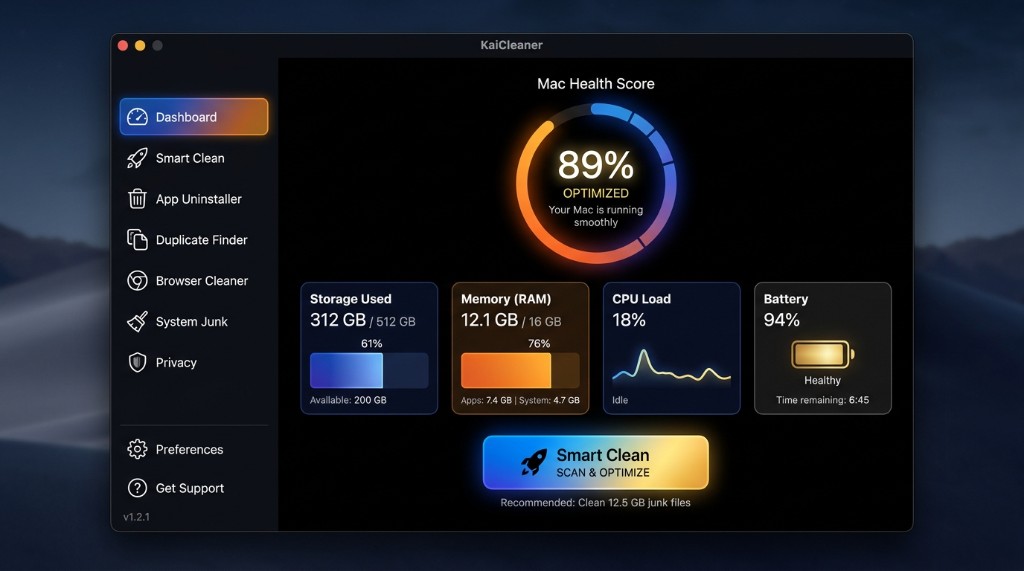
KaiCleaner finds the caches, logs, and developer junk eating your storage — then moves everything to the Trash instead of deleting it outright. A wrong guess costs you nothing.

Free · macOS 14+ · Hosted at kaicleaner.kainoter.com · Claude AI advisor · Notarized by Apple

How to install — the download is a disk image (KaiCleaner.dmg), not a text file. Do not open it in a code editor.
  1. Double-click KaiCleaner.dmg in Finder
  2. Drag KaiCleaner into your Applications folder
  3. Open KaiCleaner from Applications — Gatekeeper should show no warnings
Built for a locked-down macOS

System Integrity Protection and the read-only system volume exist for a reason — aggressive cleaners that fight them are how you end up with a broken app or a kernel panic. KaiCleaner doesn't fight macOS. It works within it.

Never permanently deletes — everything goes to the Trash
Only touches your own home folder by default
Safe mode skips files modified in the last 24 hours
Stop any scan mid-way — partial results, no half-finished cleanup
Full Disk Access is detected at runtime — not just a toggle

What we never touch

Even with Full Disk Access enabled, KaiCleaner blocks these paths by design.

/System and SIP-protected paths LaunchAgents & LaunchDaemons Other user accounts App bundles (.app) TCC / privacy databases Kernel extensions & preference panes

What's new in v1.2

CleanMyMac-style depth, KaiCleaner safety.

Smart Scan & cleanup

  • Unified Smart Scan — one Dashboard button scans junk, browsers, Mail, Downloads, malware heuristics, and large files
  • Browser caches — Safari, Chrome, Firefox, and Edge (passwords never touched)
  • Mail attachments — large files stored by the Mail app
  • Old Downloads — files over 10 MB untouched for 90+ days
  • Space Lens — visual treemap in Storage Analyzer
  • Menu bar quick clean — junk badge and one-click cache cleanup
  • Claude AI advisor — Kai AI powered by Anthropic Claude via kaicleaner.kainoter.com
  • Auto-updates — Sparkle feed hosted on Vercel at kaicleaner.kainoter.com

v1.1 reliability (still included)

  • SafetyPolicy with automated tests, ScanCoordinator caching, safe mode, FDA detection, audit logging

Everything in one place

Real scans, real numbers — every metric is read directly from your Mac's hardware.

Smart & Deep Clean

Caches, logs, and developer build artifacts from Xcode, npm, Homebrew, CocoaPods, and more.

Storage Analyzer

See exactly which folders are using your disk space, ranked and visualized at a glance.

Duplicate & Large File Finder

True content hashing finds real duplicates — not just matching filenames.

App Uninstaller

See every leftover cache, preference, and saved state before anything is removed.

Live System Monitors

Real memory, CPU, battery health, and SSD status — measured, never simulated.

Kai, your cleanup advisor

Offline cache and file explainer — ask "is it safe to delete com.apple.bird" and get a specific answer.

How KaiCleaner compares

Competitors win on feature count. KaiCleaner wins on trust.

KaiCleaner CleanMyMac OnyX
Cleaning goes to Trash by default ✓ Always Varies Often permanent
Home-folder scope by default ✓ Yes Broad scans System-level
Safe mode (skip recent files) ✓ Built in
Developer cache presets ✓ Xcode, npm, Brew Some ✓ Deep
Price Free Subscription Free
Ease of use Simple UI Polished Power-user

Ready when you are

Signed with a Developer ID and notarized by Apple — installs with zero Gatekeeper warnings.

⬇ Download KaiCleaner v1.2

File: KaiCleaner.dmg · Open in Finder, not a text editor